
If you've noticed broken images where company logos used to be in your app, you're not alone. The simple, free Clearbit API logo service that developers have relied on for years has been officially shut down.
This isn't a bug; it's a strategic shift following Clearbit's acquisition by HubSpot, as the company moves toward more integrated, paid solutions. Let's break down what happened and why it matters.
What Happened to the Clearbit Logo API

For a long time, the Clearbit Logo API was the go-to tool for a simple job: you give it a company domain, and it gives you back a high-quality logo. That's it. This dead-simple functionality made it a favorite for adding a quick, professional touch to countless applications without any complex setup.
The shutdown wasn't sudden. It was part of a larger pivot after the HubSpot acquisition. Clearbit started phasing out several of its free tools to double down on deeper integrations within the HubSpot ecosystem. As of December 1, 2025, the Logo API was officially retired, joining other free services like the Clearbit Platform and the Weekly Visitor Report on the chopping block.
This move signals a clear pivot toward enterprise-grade, paid features and more sophisticated, AI-driven data enrichment.
Why Its Absence Is Widely Felt
The impact of this sunset is huge because of how integral the API became to so many user experiences. It was never just about making things look pretty; it was a core component for creating richer, more intuitive products.
Some of the most common use cases included:
- Enriching User Profiles: SaaS dashboards everywhere used logos to visually represent customer accounts, making long lists and reports much easier to scan.
- Personalizing Onboarding: Showing a new user's company logo during signup creates an immediate sense of personalization and builds instant credibility.
- Improving Sales Tools: Internal CRMs and sales outreach platforms pulled in logos to give reps quick visual context on their leads and accounts.
- Enhancing Fintech Applications: Financial platforms used logos to clean up messy transaction feeds, making it far easier for users to recognize merchants at a glance.
The real magic was its simplicity. A single, unauthenticated API call could add a layer of visual polish that made an application feel more alive and professional. Its absence leaves a real functional and aesthetic gap for many development teams.
Understanding this context is key. You don't just need a one-to-one replacement; you need an alternative that is reliable, scalable, and fits into a modern development workflow.
For teams looking for a direct path forward, our guide on migrating from the Clearbit shutdown to Brand.dev provides actionable steps and code examples to get you back up and running.
A Practical Guide to Calling a Logo API
Getting a company logo with an API feels like it should be simple, but building a system that doesn't break means thinking through all the real-world hiccups you're bound to hit. The old Clearbit API logo endpoint was popular for its simplicity, but a production-ready setup needs to be much more robust. Let's walk through how to build a reliable logo-fetching process from start to finish.
The basic idea is you send a company's domain to an API and get back a JSON response. That response usually has a URL pointing to the logo, which you can then pop into your app's frontend. Easy enough, but the devil is in the details.
Structuring the API Request
First things first, you have to make an authenticated request. Unlike the old unauthenticated Clearbit endpoint, modern APIs like Brand.dev require an API key to track usage and keep things secure. You'll typically pass this key in the Authorization header as a Bearer token.
For example, a typical request looks something like this:
- Method:
GET - Endpoint:
https://api.brand.dev/v1/brands/brand.dev - Header:
Authorization: Bearer YOUR_API_KEY
Here, the domain (brand.dev) is the key identifier. The API uses it to look up the brand and find the right logo. A successful request gets you a 200 OK status and a JSON payload with all the goods.
Parsing the Response and Handling Fallbacks
The JSON response is where the magic happens. You’ll usually get an object packed with different brand assets. Your job is to parse this object and pull out the logo URL.
But what happens when a logo just isn't there? An API might send back a 404 Not Found, or maybe the JSON payload is missing the logo key entirely. Your app needs to handle this gracefully. The last thing you want is a broken image icon messing up your UI.
Pro Tip: Always have a default placeholder logo ready to go. This can be a simple generic building icon or even just a clean gray square. It’s a small detail, but it prevents a jarring user experience and makes your app look far more professional when data is incomplete.
A solid implementation always checks for a successful response and the presence of a logo URL before trying to display anything. If either check fails, it seamlessly swaps in your placeholder image. For a deeper look at this, our guide on choosing a company logo API covers more advanced strategies.
Addressing Low-Resolution Images
Another classic problem is getting a logo that’s low-quality or in a format that doesn’t play nice with your design. Some APIs are smart enough to return multiple image formats or sizes, which lets you pick the best fit for your UI.
Your logic should prioritize specific formats if they're available:
- SVG: This is always the top prize. SVGs are scalable and stay perfectly crisp on any screen.
- Transparent PNG: The next best thing, perfect for placing logos over different colored backgrounds.
- High-Resolution JPG: A decent fallback if vector formats aren't an option.
By checking for these formats in order, you can make sure you’re always displaying the best possible version. This simple step prevents pixelated logos from making your product look cheap, especially on high-res displays. It’s this kind of proactive thinking that turns a simple API call into a truly reliable system that consistently polishes your user interface.
Building a Production-Ready Logo System
Making a single API call is one thing. Building a system that serves up logos instantly to thousands of users without buckling is another beast entirely. When you move from a simple script to a production environment, you need battle-tested strategies to keep your app fast, resilient, and cost-effective, especially when you're relying on a third-party service.
The world of data enrichment, where the original Clearbit service made its mark, is exploding. Projections show it rocketing from $1.3 billion in 2020 to an expected $5.5 billion by 2025. This is fueled by the 85% of businesses using these tools to sharpen their sales and marketing. This insane growth underscores just how critical it is to build systems that can handle the speed and scale modern apps demand.
The basic flow for grabbing a logo is pretty straightforward.
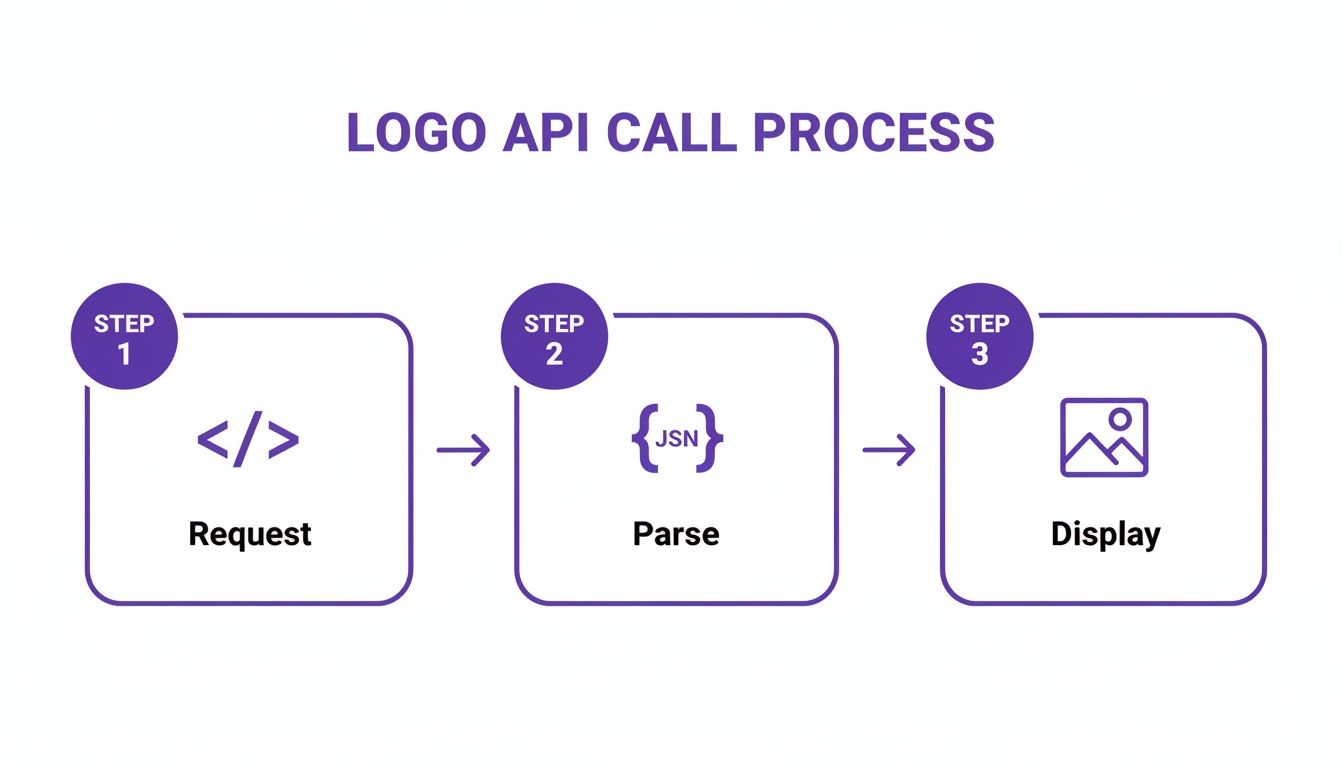
But to prevent bottlenecks in a live app, every single step in that process needs to be optimized.
Implement Smart Caching and CDN Delivery
The single most impactful optimization you can make is adding a rock-solid caching layer. Hitting an API for the same company logo over and over again is a massive waste of time and money. A good caching strategy slashes latency for your users and cuts down on redundant API calls, saving you cash.
You can, and should, implement caching at a few different levels:
- Application-level caching: Use an in-memory store like Redis or Memcached to hang onto logo URLs for a set time, maybe 24 hours.
- Database caching: After the first successful fetch, just store the logo URL right in your company or user table. Simple and effective.
- CDN for images: For a serious performance boost, serve the actual logo images through a Content Delivery Network (CDN). This takes the load off your servers and gets images into your users' browsers faster, no matter where they are in the world.
By mixing these techniques, you create a powerful system where you only hit the logo API once for any given domain. Every request after that gets served instantly from your cache or CDN. This is the absolute cornerstone of a scalable logo system.
Handle Rate Limits and Errors Gracefully
Every production-grade API has rate limits. They’re there to prevent abuse and keep the service stable for everyone. Your system must be built to anticipate and manage these limits, or you're asking for service disruptions. When you send too many requests in a short period, the API will hit you back with a 429 Too Many Requests status code.
This is where robust error handling becomes non-negotiable. You need logic that can gracefully handle these common hiccups. A classic move is to implement an exponential backoff strategy, where your app waits for a progressively longer period before retrying a failed request. You can find some great strategies for fixing rate limit exceeded errors to make your system much more resilient.
But it’s not just about rate limits. Your app also needs to be ready for other potential failures, like a 500 Internal Server Error from the API or a simple network timeout. A well-designed system will catch these errors, log them so you can debug later, and fall back to a default logo without breaking the user experience. This kind of preparation is what separates a professional, dependable application from a brittle one.
Migrating from Clearbit to Brand.dev
With the Clearbit API logo service officially sunset, many development teams are looking for a clear path forward. Migrating to a new provider can seem like a headache, but a modern alternative like Brand.dev is engineered to be a near drop-in replacement, often just needing a few tweaks to your code.
The goal here isn't just to patch a broken integration. It's a chance to seriously upgrade your app's branding capabilities. While Clearbit gave you a simple logo, Brand.dev delivers a full suite of brand assets, think colors, fonts, and even backdrop images, all from a single, unified API call.
Feature and Endpoint Comparison
At a high level, the logic is the same: give the API a domain, get brand assets back. But that's where the similarities end. The structure of the request and, more importantly, the richness of the response are worlds apart. Clearbit’s old endpoint was famously simple, but Brand.dev serves up a much more structured and detailed JSON payload.
Let's break down exactly what to expect when you make the switch.
Clearbit Logo API vs. Brand.dev Feature Comparison
This table lays out the key differences you'll encounter during the migration. The biggest shift is moving from a simple image redirect to handling a structured JSON response, which unlocks far more control and data for your application.
| Feature | Clearbit Logo API (Legacy) | Brand.dev |
|---|---|---|
| Authentication | None | Bearer Token (API Key) |
| Primary Endpoint | logo.clearbit.com/:domain | api.brand.dev/v1/brands/:domain |
| Primary Data Point | Single Logo URL | Full Brand Kit (logo, colors, fonts) |
| Response Format | Redirect to image | JSON Object |
| Image Variations | Limited (size params) | Multiple formats (SVG, PNG) |
| Error Handling | Basic HTTP errors | Detailed JSON error messages |
This move from a direct image to a JSON object is the most significant change. It requires a small adjustment in how you parse the data, but the payoff is huge, you get more reliable assets and deeper brand information to work with.
TypeScript Migration Example
Switching your code over is surprisingly straightforward. Where you once just constructed a URL string for Clearbit, you'll now make an authenticated fetch request to the Brand.dev API and parse the JSON it sends back.
Here’s a practical look at how you'd update a TypeScript function.
Before (Clearbit):
function getClearbitLogoUrl(domain: string): string { // Simple URL construction, no API call needed return https://logo.clearbit.com/${domain}; }
// Usage const logoSrc = getClearbitLogoUrl('stripe.com'); // logoSrc is "https://logo.clearbit.com/stripe.com"
After (Brand.dev):
import axios from 'axios';
async function getBrandDevLogo(domain: string): Promise<string | null> { const apiKey = process.env.BRAND_DEV_API_KEY; if (!apiKey) { console.error("API key is missing."); return null; }
try { const response = await axios.get( https://api.brand.dev/v1/brands/${domain}, { headers: { Authorization: Bearer ${apiKey} }, } );
// Prioritize SVG, then PNG
const logo = response.data.logos.find(l => l.type === 'symbol' || l.type === 'logo');
const svg = logo?.formats.find(f => f.format === 'svg');
const png = logo?.formats.find(f => f.format === 'png');

return svg?.src || png?.src || null;
} catch (error) { console.error(Failed to fetch logo for ${domain}:, error); return null; // Return null to fall back to a default logo } }
// Usage const logoUrl = await getBrandDevLogo('stripe.com');
As you can see, the new function is far more robust. It handles authentication, parses the JSON response, and even intelligently picks the best logo format available (SVG over PNG). This is a massive improvement in functionality for just a few extra lines of code.
Python Migration Example
The story is much the same for Python developers. You'll swap out a simple URL string for an actual API call using a library like requests and then work with the JSON response.
Before (Clearbit):
def get_clearbit_logo_url(domain): """Constructs the URL for the Clearbit Logo API.""" return f"https://logo.clearbit.com/{domain}"
Usage
logo_src = get_clearbit_logo_url("stripe.com")
After (Brand.dev):
import os import requests
def get_brand_dev_logo(domain): """Fetches a company logo URL from the Brand.dev API.""" api_key = os.environ.get("BRAND_DEV_API_KEY") if not api_key: print("API key not found.") return None
url = f"https://api.brand.dev/v1/brands/{domain}"
headers = {"Authorization": f"Bearer {api_key}"}

try:
    response = requests.get(url, headers=headers)
    response.raise_for_status()  # Raises an HTTPError for bad responses
    data = response.json()

    # Find the primary logo and prefer SVG format
    for logo in data.get("logos", []):
        if logo["type"] in ["symbol", "logo"]:
            for fmt in logo.get("formats", []):
                if fmt["format"] == "svg":
                    return fmt["src"]
            # Fallback to the first PNG if no SVG is found
            for fmt in logo.get("formats", []):
                if fmt["format"] == "png":
                    return fmt["src"]

except requests.exceptions.RequestException as e:
    print(f"Error fetching logo for {domain}: {e}")

return None
Usage
logo_url = get_brand_dev_logo("stripe.com")
With these small adjustments, you can quickly move your application off the deprecated Clearbit API logo and onto a more powerful and reliable platform. For a complete walkthrough, check out our detailed guide on migrating from Clearbit to Brand.dev.
How to Judge the Quality of a Logo API
Let’s be honest: not all logo APIs are built the same. The real difference isn't just in the uptime or the documentation, but in the quality and reliability of the data they serve up. Many of us learned this the hard way when the original Clearbit API logo service started showing its age.
There's nothing that screams "out of date" faster than displaying an old or flat-out wrong logo. It instantly chips away at your product's credibility. This makes data quality an absolute deal-breaker when you're looking for a new provider.
The best services don't just find a logo on a homepage and call it a day. They dig deeper, cross-referencing brand assets from official company filings, social media profiles, and website metadata to make sure they've got the most current, official version. This is what stops you from accidentally showing a parent company's logo for one of its subsidiaries, a surprisingly common mistake.
Freshness Is Everything
A static database of logos is a ticking time bomb. Brands rebrand, get acquired, or just tweak their look all the time. Your API provider needs a solid, ongoing process for refreshing its data and, ideally, some human oversight to catch the nuances. If they don't, your app will inevitably start looking stale.
The gold standard is a mix of smart automation and human review. Automation is great for flagging potential changes, but it often takes a person to understand the context of a rebrand or tell two very similar brand identities apart.
For a long time, Clearbit was the benchmark here. They had a rigorous four-step verification process that included a 30-day recency check, multi-source validation, anomaly detection, and a final human sign-off. It’s how they hit a 95% company-level accuracy rate, and that’s a number you should keep in your back pocket when sizing up alternatives. If you want to go deeper, you can find more on Clearbit's data processes and how they approached sales intelligence.
The Questions You Need to Ask
When you’re kicking the tires on a potential replacement, don't stop at the API docs. You have to get into the weeds and ask the tough questions about where their data actually comes from and how they maintain it.
Here are the essentials I always cover:
- Update Frequency: How often do you refresh your brand data? Is it a daily thing, a weekly batch, or only when someone reports an issue?
- Verification Process: Walk me through your steps. How do you confirm a logo is authentic and current?
- Source Diversity: Where are you getting your brand assets? Is it just one source, or are you pulling from multiple, reputable places?
- Handling Rebrands: What’s your process for catching and updating logos when a company rebrands or gets bought out?
Your goal is to find a service you can trust to keep your application looking professional and current. Getting straight answers to these questions will help you find a real partner and sidestep the all-too-common problem of bad brand data.
Common Questions About Logo APIs
When a service like the Clearbit Logo API goes offline, it tends to leave a trail of broken image links and confused developers. If you're sorting through the aftermath or just looking for a better way forward, you’re not alone. Here are some quick answers to the questions we hear most often.
What Happened to the Clearbit Logo API?
The shutdown was a business decision following Clearbit's acquisition by HubSpot. As the two companies merged, HubSpot began trimming older, free tools to double down on its core paid services. The free Logo API was officially sunset on December 1, 2025, as part of a larger strategy to integrate Clearbit’s data enrichment features more tightly into the HubSpot platform.
What’s the Best Direct Replacement for Clearbit?
For anyone looking for a simple, one-to-one replacement that’s actually more powerful, Brand.dev is your best bet. It’s designed to be a near drop-in solution.
The old Clearbit endpoint just gave you a single image URL. Brand.dev, on the other hand, returns a full JSON object packed with useful brand assets, logos in multiple formats (SVG, PNG), company colors, fonts, and more. You get the logo you need, plus a whole lot more data to play with.
Do I Need an API Key Now?
Yep. Pretty much any modern logo API worth its salt will require an API key. This is just standard practice now, it helps providers manage usage, stop abuse, and offer reliable service tiers.
So, unlike the old, unauthenticated Clearbit endpoint, you’ll need to sign up for a service like Brand.dev to get a key. You'll then pass that key in your API calls, usually as a Bearer token in the Authorization header.
Honestly, this move to authenticated requests is a good thing for developers. It means better stability, access to real support, and opens the door for features that were never possible on a free-for-all endpoint.
How Should I Handle Missing or Bad Logos?
Never assume an API call will work perfectly every time. The best approach is to build a smart, multi-layered fallback system right into your code. A logo might not exist for a new domain, or the API might return something low-quality.
Here’s a simple, robust strategy:
- Have a primary fallback. This is your generic placeholder, like a simple building icon. If an API call fails or comes back empty, you show this instead. No broken images, ever.
- Set a quality threshold. Sometimes an API returns a logo, but it’s a tiny, pixelated mess. Your code should be able to detect a low-resolution image and opt for your placeholder instead.
- Build a manual override. For applications where logos are critical, give your team a simple way to flag an incorrect logo and upload a better one. This gives you an escape hatch when the data isn't perfect.
A solid integration doesn't just fetch data; it anticipates the messy realities and handles them gracefully. This way, your UI always looks professional, even when the data pipeline hiccups.
Ready to upgrade your logo integration? With Brand.dev, you can swap out the old Clearbit API endpoint in minutes and get access to a full suite of brand assets. Create richer, more personalized user experiences today. Get your free API key at https://brand.dev.