
Let's be honest: API documentation is often treated as a chore, a box to check right before launch. But this perspective misses a fundamental truth about how developers actually work.
Your documentation isn't just a manual; it's the user interface for your API. For a developer, it's the first, and often most critical, touchpoint with your product.
Why Great API Documentation Is Non-Negotiable
A poorly documented API creates immediate friction. When a developer has to guess, experiment, or contact support just to figure out a basic endpoint, you're wasting their time and building frustration. That negative first impression can easily lead them to abandon your API for a competitor's, even if your underlying tech is better.
The Business Case for Excellent Docs
Investing in high-quality documentation delivers tangible business returns. It transforms your API from a complex tool into a self-service product that developers can integrate with confidence and speed.
This shift pays off in a few key ways:
- Faster Developer Onboarding: Clear "Getting Started" guides and interactive examples slash the time it takes for a developer to make their first successful API call.
- Reduced Support Overhead: When developers can find answers themselves, they don’t file support tickets. This frees up your engineering team to focus on core product development, not repetitive troubleshooting.
- Increased API Adoption: A great developer experience (DX) is a powerful driver of adoption. Developers who find your API easy to use are far more likely to recommend it to their peers.
- Enhanced Brand Perception: Meticulous documentation signals a deep commitment to quality and customer success. It builds trust and positions your company as a reliable partner.
Your documentation is a direct reflection of your API's quality and your company's attention to detail. If the docs are confusing, developers will assume the API is too.
The industry data backs this up. Postman's State of the API report found that 82% of organizations have adopted an API-first approach. The ones who treat APIs as products, which absolutely includes investing in documentation, report faster integration times and higher revenue.
Ultimately, great documentation isn't a cost center; it's a growth engine. It empowers developers, builds community trust, and creates a scalable foundation for your entire API program. To see these principles in action, check out how a well-structured company data API can make complex information incredibly accessible.
Designing a Documentation Structure That Guides Developers
Great API documentation isn't just a raw list of endpoints; it's a carefully designed journey. The structure itself should act as a guide, leading a developer from their first "what is this?" moment all the way to a successful integration, with as little friction as possible.
When you nail the structure, developers feel confident. They can focus on building cool things with your API, not on deciphering your docs. This is where you can lean on effective writing structures and frameworks to anticipate a developer's questions and put the answers exactly where they expect to find them. This isn't about aesthetics, it's about making your docs a functional, self-service tool that truly empowers your users.
The goal is to create an experience that feels intuitive, even for someone landing on your docs for the first time. Companies like Stripe and Twilio are masters at this. They establish a clear information hierarchy that makes their massive APIs feel approachable and easy to navigate.
The Essential Building Blocks of Your Docs
Think of your docs as a path with clear signposts. A developer's journey should follow a logical progression, and your structure needs a few non-negotiable components to make that happen. Each section serves a distinct purpose, guiding the user from zero to one.
These core sections form the backbone of any solid documentation portal:
- A Compelling Overview: This is your elevator pitch. It needs to quickly answer "What does this API do?" and "Why should I use it?" without getting lost in the technical weeds.
- A Robust Getting Started Guide: You could argue this is the most critical piece. It's the tutorial that holds a developer's hand through their very first successful API call.
- Detailed Endpoint Reference: This is the encyclopedia of your API. Once developers are up and running, this is where they'll spend most of their time.
- Practical Tutorials and Recipes: These go beyond the reference docs to solve real-world problems. They show how to chain together different endpoints to achieve something specific, like "How to prefill a user signup form with brand data."
This layered approach works because it meets developers where they are. A brand-new user desperately needs the "Getting Started" guide, while a seasoned pro will jump straight to the "Endpoint Reference" to check a specific parameter.
Crafting the Getting Started Guide
Your "Getting Started" guide has one job: get the developer to a successful "Hello, World!" moment as fast as humanly possible. This section is all about building momentum. Keep it focused, linear, and completely free of distractions.
A great guide breaks the process down into a few simple, manageable steps:
- Authentication Explained Simply: Clearly show how to get an API key and how to use it. The key here is providing a copy-paste-ready example of an authenticated request.
- Your First API Call: Give them a simple, can't-fail request that returns a predictable response. For Brand.dev, a perfect example would be fetching the brand information for a well-known domain like
stripe.com. - Code Samples in Multiple Languages: Show, don't just tell. Providing complete, working code snippets in popular languages like TypeScript, Python, and Ruby is a small effort that saves developers an immense amount of time.
A developer's first five minutes with your docs are the most important. If they can make a successful API call in that time, they are significantly more likely to integrate successfully.
The Anatomy of an Endpoint Reference
Once a developer is authenticated and has made their first call, they'll turn to the reference docs for deeper exploration. Clarity, completeness, and predictability are everything here. Every single endpoint should have its own dedicated page that acts as a contract between you and the developer.
For each endpoint, you absolutely must document the following:
| Element | Description | Why It's Critical |
|---|---|---|
| HTTP Method & Path | e.g., GET /v1/brands/domain/{domain} | This is the fundamental instruction for making the request. |
| Human-Readable Description | "Fetches the full brand kit for a given company domain." | It provides immediate context on what the endpoint actually does. |
| Parameters | Path, query, and body parameters with types and descriptions. | This prevents guesswork and drastically reduces malformed requests. |
| Request & Response Examples | Full, valid JSON examples for both a successful request and response. | This is the fastest way for a developer to understand the data structure. |
| Error Codes | A list of possible HTTP status codes and what they mean in context. | It's crucial for building robust, production-ready error handling. |
By structuring your documentation this way, you create a predictable and empowering experience. Developers will know exactly where to look for information, which builds the trust and confidence needed for a successful, long-term partnership.
Automating Your Docs with OpenAPI
Let's be honest: manually updating documentation every time an API changes is a surefire way to create bugs, frustrate developers, and guarantee your docs are perpetually out of date. This is where automation isn't just a nice-to-have, it's your most powerful ally. Adopting a spec-first approach with the OpenAPI standard is the single biggest leap you can make for modern, scalable API documentation.
Instead of treating docs as a separate, manual chore, you define your API's entire structure in a single, machine-readable YAML or JSON file. This spec file becomes the single source of truth for your API's contract, every endpoint, parameter, request body, and response schema lives here.
The Power of a Single Source of Truth
When your OpenAPI specification becomes the official definition of your API, it unlocks a whole ecosystem of automation. Any change to the API, a new endpoint, a deprecated field, happens in the spec file first. From there, the documentation, client-side code, and even server-side tests can be generated automatically. Everything stays perfectly in sync.
This workflow finally solves "documentation drift," that all-too-common problem where the docs say one thing and the API does another.
An OpenAPI specification doesn't just describe your API; it becomes your API. It's the blueprint that drives development, testing, and, most importantly, the creation of accurate, interactive documentation.
From Spec to Interactive Experience
The real magic happens when you feed this OpenAPI file into modern documentation tools. Platforms like Swagger UI or Redoc can instantly transform that spec into a beautiful, interactive documentation site where developers can learn and experiment in real-time.
This is the ideal flow for guiding a developer through your docs, moving from a high-level overview to the detailed, interactive reference that OpenAPI generates for you.
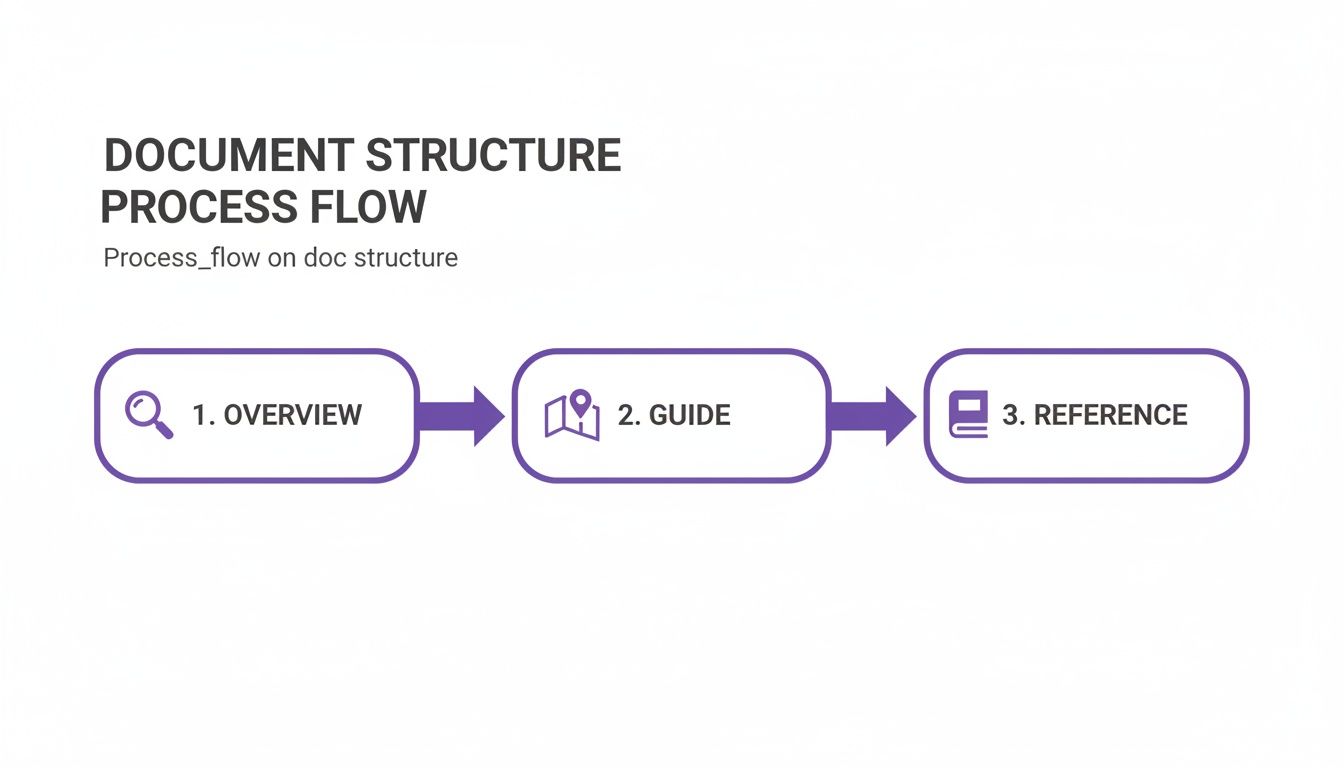
This process, overview, to guides, to reference, is exactly what an OpenAPI-generated site delivers with almost zero manual effort.
These tools parse your spec and automatically generate:
- A Navigable Endpoint List: A clean, organized menu of every available endpoint.
- Detailed Parameter Info: Clear tables outlining every required and optional parameter, complete with data types and descriptions.
- Request and Response Schemas: Visual models of the expected JSON structures.
- An Interactive API Explorer: A built-in client that lets developers make live API calls directly from the browser.
That last point is a total game-changer. Instead of just reading about an endpoint, a developer can plug in their API key, fill out the parameters, click "Execute," and see a real request and response. It shortens the learning and debugging loop from hours to minutes.
A Look at a Well-Structured OpenAPI Snippet
Creating a high-quality spec is about more than just listing paths and parameters. The richness of your descriptions and examples directly translates to the quality of the generated docs. A little effort here goes a long way.
Let’s imagine a Brand.dev endpoint for fetching company brand data. Here’s a snippet of what the OpenAPI spec might look like:
paths: /v1/brands/domain/{domain}: get: summary: "Get Brand by Domain" description: "Fetches the full brand kit, including logos, colors, and fonts, for a given company domain." operationId: "getBrandByDomain" tags: - "Brands" parameters: - name: "domain" in: "path" required: true description: "The company domain to look up (e.g., stripe.com)." schema: type: "string" example: "brand.dev" responses: '200': description: "Successful response with brand data." content: application/json: schema: $ref: '#/components/schemas/Brand' example: name: "Brand.dev" domain: "brand.dev" logos: - format: "svg" url: "https://assets.brand.dev/logo.svg" '404': description: "Brand not found for the specified domain."

Notice the small details that make a huge difference in the final documentation:
summary: A short, punchy title for the endpoint that’s easy to scan.description: A more detailed explanation of what the endpoint does and why a developer would use it.example: Providing a concrete example (brand.dev) makes the parameter instantly understandable.$ref: This points to a reusable schema, which keeps your spec DRY (Don't Repeat Yourself) and much easier to maintain.
By investing time in a rich, descriptive OpenAPI specification, you're not just writing documentation; you're building an automated system that guarantees accuracy and provides a world-class developer experience. This approach turns documentation from a maintenance headache into a strategic asset.
Writing Content That Developers Actually Use
A slick, automated documentation site means nothing if the words on the page are confusing, vague, or just plain unhelpful. Once you've got the scaffolding in place, the content itself becomes the single most important part of the developer experience. The goal here isn't just to be technically accurate, but to be genuinely useful, to guide a developer to their goal with absolute clarity.
You have to shift your mindset from merely describing features to actually explaining their value and context. A developer doesn't just want to know what an endpoint does. They need to understand why they should use it and how it slots into a real-world workflow.
Focus on Clarity and Action
Good technical writing for developers is direct, concise, and unambiguous. Ditch the jargon and corporate fluff. Every sentence should be crafted with simple language and an active voice to make instructions crystal clear and easy to follow.
The active voice is especially critical. It assigns responsibility and makes instructions feel immediate. "The endpoint returns user data" is worlds better than "User data is returned by the endpoint." It’s a tiny change, but it makes the API feel more responsive and the process easier to grasp.
Always write from the developer's perspective. Think about the questions they'll have before they even ask them. Your docs should feel less like a dense textbook and more like getting advice from a helpful senior engineer.
Another non-negotiable? Complete, copy-paste-ready code examples. A fragmented snippet that someone has to piece together is just adding friction. Make sure every example is a working piece of code they can run immediately. This builds trust and gets them to that "aha!" moment much faster.
Provide Context, Not Just Commands
One of the biggest mistakes I see in API documentation is the failure to explain the "why." Sure, documenting an endpoint that retrieves a company logo is useful. But explaining how to use that logo to dynamically theme a new user's dashboard? That's invaluable. This is what transforms a simple API reference into a practical, indispensable guide.
For example, when you're detailing a Brand.dev endpoint, don't just list the parameters. Show how it solves a real problem:
- Weak Context: "The
/v1/brands/logoendpoint returns a company's logo." - Strong Context: "Use the
/v1/brands/logoendpoint during signup to instantly personalize a new user's workspace. By fetching their company logo and displaying it in the UI, you create a tailored onboarding experience that can significantly boost activation."
This approach helps developers connect your API's features to their own business goals. It sparks ideas and encourages them to build deeper, more meaningful integrations. For a deeper dive, check out our guide on using a company logo API for exactly this kind of user personalization.
Good vs. Bad Documentation Writing
It's amazing how small tweaks in language can have a massive impact on how usable your documentation is. When you're writing, you're constantly making choices between being vague and being explicit.
Here's a quick comparison to show what a difference clear, action-oriented writing makes.
| Documentation Element | Ineffective Example (Vague & Passive) | Effective Example (Clear & Action-Oriented) |
|---|---|---|
| Endpoint Summary | Data Retrieval Endpoint | Get User Profile by ID |
| Parameter Description | This is the identifier string for the user. | The unique userId for the user you want to retrieve. |
| Error Message Help | An authentication error was encountered. | 401 Unauthorized: Your API key is invalid or missing. Check your Authorization header. |
| Code Example Intro | Below is a code sample. | To create a new project, send a POST request to /v1/projects with the following JSON body: |
See the difference? The effective examples are specific, they use active language, and they give developers the context they need right away. When you adopt this style, your documentation stops being a chore to read and becomes an empowering tool that helps developers build faster and with way more confidence.
Keeping Your Documentation Accurate and Alive
There's one thing that will kill developer trust faster than anything else: documentation that lies. An outdated endpoint description, a missing parameter, or an incorrect response example can send a developer down a rabbit hole of debugging, eroding their confidence in your API with every wasted minute.
Great documentation isn't a "set it and forget it" project. It's a living product that must evolve in lockstep with your API. Without a robust process for keeping it accurate, your docs will inevitably decay into a source of frustration. This is where we shift from writing and design to lifecycle management.
Version Docs Alongside Your Code
Your API documentation should be treated just like your codebase. The best way to keep docs and code in sync is to apply the same battle-tested version control best practices you already use. This means your docs should live in the same repository as your API source code and go through the same pull request and review process.
When documentation is managed this way, it stops being an afterthought and becomes an integral part of the development workflow.
- Enforce Docs with Code: Make documentation updates a required part of any pull request that changes the API's public contract. No exceptions.
- Peer Review: Review documentation changes with the same rigor you apply to code. This is where you catch inaccuracies or unclear language before they cause problems.
- Clear History: Git provides a perfect audit trail, showing you exactly who changed what, when, and why.
This tight coupling is your best defense against drift. A change can't be merged until its corresponding documentation is also written, reviewed, and approved.
Integrate Documentation into Your CI/CD Pipeline
The most bulletproof way to guarantee your docs are always current is to automate their deployment. By integrating documentation builds into your Continuous Integration/Continuous Deployment (CI/CD) pipeline, you can ensure that every time new code is deployed to production, the corresponding documentation goes live with it.
Stale documentation is worse than no documentation at all. Automating your doc deployment through a CI/CD pipeline is the single most effective strategy for preventing documentation drift and maintaining developer trust.
This process typically involves a pipeline stage that runs a command to build your documentation site, often from an OpenAPI specification, and then pushes the resulting static files to your hosting provider. This automated step removes human error and kills the "I'll update the docs later" mindset that leads to decay.
The Power of a Clear Changelog
Developers who depend on your API need to know what’s changing, especially when those changes might break their existing integrations. A well-maintained changelog isn't just a list of updates; it’s a critical communication tool that builds trust and transparency.
A genuinely useful changelog should be:
- Easily Accessible: Link to it prominently from your main documentation page. Don't make people hunt for it.
- Clearly Organized: Group changes by version and date. Use clear headings for things like "Added," "Changed," "Deprecated," and "Fixed."
- Action-Oriented: For breaking changes, provide clear, actionable migration guides that show developers exactly what they need to do to adapt their code.
PayPal’s API documentation, for instance, provides excellent release notes that make it simple for developers to track recent updates and plan accordingly. This practice is a cornerstone of a healthy developer ecosystem.
Create Feedback Loops with Your Community
Your documentation is never truly "done." The developers using your API are your best resource for finding confusing explanations, spotting gaps, and suggesting improvements. You need to create direct channels for them to provide that feedback.
- Simple Widgets: Add a "Was this page helpful?" widget with a simple thumbs up/down and an optional comment box at the bottom of every page.
- Direct Edit Suggestions: For open-source docs (e.g., on GitHub), an "Suggest an edit" link can take users directly to the source file to submit a pull request.
- Support Channels: Link to your developer forum, Discord server, or support desk so users can ask questions when they get stuck. This feedback often shines a light on weak spots in the docs.
Gathering this input, and more importantly, acting on it, shows your developer community that you're listening. It turns documentation from a one-way broadcast into a collaborative conversation.
Some companies have even found that a well-trained AI assistant can surface common points of confusion by analyzing user questions, as detailed in how DocsBot reduces onboarding friction. This is a great way to prioritize which pages need the most attention.
Common API Documentation Questions
Even with the best intentions, teams often hit the same roadblocks when it comes to API docs. It's just part of the process. Getting ahead of these common hurdles with a few battle-tested strategies can turn a frustrating project into a living resource that developers actually enjoy using.
Let's walk through some of the most frequent questions that come up and tackle them with real-world advice.
How Do We Get Started if Our API Has No Docs?
Staring at an API with zero documentation can feel paralyzing. But look at it this way: it’s a golden opportunity to build a solid foundation without dealing with legacy baggage. The absolute best place to start is by generating an initial OpenAPI specification.
You don't have to write it all by hand, either. There are tools that can "sniff" your API traffic or inspect your codebase to automatically spit out a baseline spec. Just like that, you have a machine-readable inventory of every endpoint you've got.
Once that baseline exists, your job is to enrich it. Don't try to boil the ocean and document every single thing at once.
- Prioritize ruthlessly. Start with the endpoints developers need to succeed. This usually means authentication, core data retrieval, and the main actions a user would take.
- Write for humans. For those high-priority endpoints, fill in the
summaryanddescriptionfields. Explain what the endpoint does and, more importantly, why someone would use it. - Add real examples. Manually add concrete request and response examples. For a developer trying to get their first API call to work, this is often the most valuable piece of the entire puzzle.
- Ship it fast. Use your new spec to generate an interactive UI with a tool like Swagger UI or Redoc. This gets something useful into developers' hands immediately while you continue building out the rest.
This iterative approach is your secret weapon. You deliver a useful, if incomplete, set of docs quickly and then make it better over time.
Whats the Best Way to Handle Multiple API Versions?
Managing docs for multiple API versions is mission-critical. Nothing erodes developer trust faster than showing them documentation for the wrong version, leading to broken integrations and a whole lot of frustration. The gold standard is to maintain a completely separate, easily accessible version of the documentation for each supported version of your API.
Your documentation site absolutely needs a clear, highly visible version switcher. This lets developers lock into the exact API version they're building against. When you cut a new release, you create a new version of the OpenAPI spec, which then becomes the source of truth for that version's documentation.
A detailed and easy-to-find changelog isn't a "nice to have", it's non-negotiable. It needs to spell out what's new, what's changed, and what's deprecated, complete with clear migration instructions.
This is the exact practice you'll see from companies like Stripe and PayPal. It prevents you from breaking things for existing users and gives everyone else a clear path forward when they're ready to upgrade.
How Much Technical Detail Is Too Much?
Finding the right level of detail is more art than science, and it all comes down to context. The trick is to layer information so developers can get precisely what they need, right when they need it.
For your endpoint reference, there’s almost no such thing as too much detail. This is where developers demand precision. Be exhaustive.
- Detail every single path, query, and body parameter.
- Document every possible HTTP response code, especially the errors.
- Provide the full, exact schema for all request and response bodies.
For your getting started guides and tutorials, however, you should take the opposite approach. Here, you want to focus on the "happy path" and the most common use cases. Don't drown a new user in obscure edge cases or a sea of optional parameters. The goal is a quick win.
A great way to manage this is by using UI elements to tuck away complexity until it's requested. Think expandable sections, tabs, or links that let a user drill down for more information. Give them the high-level overview first, and let them decide when they’re ready to dive into the technical weeds. This way, you provide enough information to be useful without putting up a wall of text that scares new developers away.
Ready to create a personalized, on-brand experience for your users in minutes? With Brand.dev, you can fetch company logos, colors, fonts, and more with a single API call. Skip the manual asset collection and start building higher-converting onboarding flows today. Get your free API key.